
Almost every business we speak to has tried it. Someone types “write a blog post about our services” into an AI tool, gets 800 tidy words in seconds, and publishes it. A few months later, there are forty such posts on the website and very little to show for them.
The tool wasn’t the problem. The workflow was. AI content generation works well for business when AI does the heavy lifting and people supply what AI can’t: first-hand experience, real examples, judgement and accountability.
Where AI Helps – and Where People Must Lead
| Task | AI is good at | People must supply |
|---|---|---|
| Research | Summarising topics, listing common questions, spotting gaps | Checking facts against primary sources |
| Planning | Drafting outlines and headline options | Choosing the angle that fits your business and customers |
| Drafting | Producing a readable first draft quickly | Real examples, opinions and experience |
| Editing | Tightening sentences, fixing grammar, simplifying | Tone, accuracy and final judgement |
| Repurposing | Turning one article into posts, emails and summaries | Deciding what each channel’s audience actually needs |
The pattern is simple: AI handles volume and structure. People handle truth and specificity.
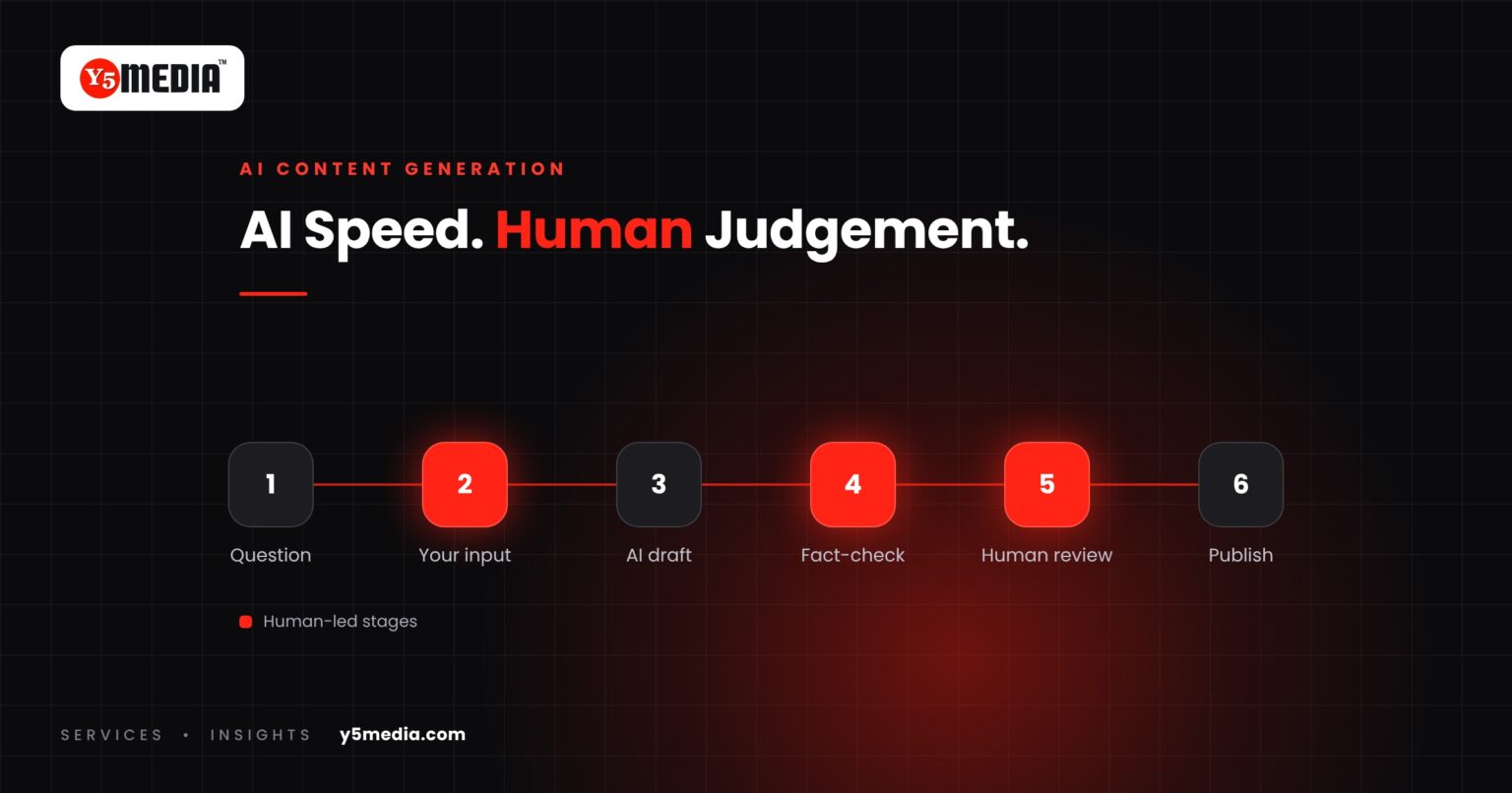
A Six-Stage Workflow That Holds Up
Stage 1: Start from a real question
Every piece should answer something a customer actually asks – in a sales call, a WhatsApp message or a review. Keep a running list. This single habit prevents most generic content.
Stage 2: Gather your own input first
Before opening an AI tool, spend fifteen minutes capturing what only your business knows: a recent project, a mistake customers commonly make, a pricing factor people don’t expect, your honest opinion. Voice notes from the person who does the work are often the best raw material.
Stage 3: Use AI to structure and draft
Give the tool the customer question, your notes, your audience and the points you want made. Ask for an outline first, adjust it, then ask for a draft. A specific brief produces a specific draft; a vague prompt produces the same article everyone else has.
Stage 4: Edit for truth and experience
- Verify every fact, figure and claim. AI tools can state incorrect information confidently.
- Replace generic examples with your own.
- Remove filler phrases and anything you wouldn’t say to a customer’s face.
- Check that the piece says something a competitor’s version wouldn’t.
Stage 5: Review by someone accountable
A person who knows the subject – the owner, a senior practitioner – reads it before it goes live. For regulated or sensitive topics such as health, finance or legal matters, this step is non-negotiable.
Stage 6: Publish, repurpose and revisit
Once live, use AI to create shorter versions for social media, email and FAQs. Then set a review date. Content that stays accurate keeps earning; content that goes stale quietly erodes trust.
What Google Says About AI-Generated Content
Google’s published guidance is clear on the principle: it rewards helpful, reliable content made for people, regardless of how it was produced. What it treats as spam is using automation – AI or otherwise – primarily to manipulate rankings, such as mass-producing pages with little value.
Google’s helpful-content guidance also suggests asking whether the use of automation is self-evident to readers, and whether the content shows first-hand experience and expertise. In practice, that means:
- Publishing fewer, better pieces rather than many thin ones.
- Making authorship and review clear.
- Demonstrating experience – photos, case details, specific numbers from your own work.
Warning Signs Your AI Workflow Has Gone Wrong
- Your articles could be published on a competitor’s site with only the name changed.
- Nobody in the business has read the last five posts end to end.
- Posts reference facts nobody has checked.
- Output volume went up, but enquiries from content didn’t.
- Different articles on your site give different answers to the same question.
- Readers – or your own staff – describe the content as “fine” but never share it.
Beyond Articles: Practical AI Uses in Content Work
Some of the highest-value uses of AI aren’t about writing full articles at all:
- Question mining – summarising recurring themes from reviews, support tickets and enquiries.
- Content audits – flagging outdated statements or overlapping pages across a large site.
- Localisation drafts – producing first drafts in local language for a fluent human to refine.
- Meta descriptions and summaries – drafting them at scale for human review.
For how content turns readers into enquiries once it’s published, see our guide on content marketing that converts visitors.
Frequently Asked Questions
Does Google penalise AI-generated content?
Google's guidance focuses on quality, not how content is produced. Helpful, accurate content made for people is fine. Using automation mainly to churn out pages to manipulate rankings is treated as spam.
Should we disclose that we use AI to write content?
Google's guidance suggests considering whether readers would reasonably expect to know how content was made. At a minimum, make authorship and review clear. Being open about your process builds trust.
How much of our content should be written by AI?
There's no fixed ratio. A good test is whether each published piece contains something only your business could have supplied – experience, examples, data or a clear opinion – and whether a knowledgeable person reviewed it.
What to Remember
- AI handles structure and speed; people supply truth, experience and judgement.
- Start every piece from a real customer question and your own notes.
- Verify every claim – AI can be confidently wrong.
- Google rewards helpful content, not the absence of AI.
- Fewer, better pieces beat high-volume generic output.
AI-Assisted Content, Done Properly
Y5MEDIA’s AI Content Generation service combines AI speed with human editors who interview your team, check every fact and write in your voice. The result is content produced efficiently that still reads as though it came from people who know the work – because it did.
Once published, our Content Publication and Content Syndication teams help it reach beyond your own website.
Want AI Speed Without Generic Content?
Tell us what you’re publishing today and how it’s produced. We’ll suggest a workflow that fits your team and show you what it produces. Request a proposal or explore the AI Content Generation service.
Sources
- Google Search’s guidance on using generative AI content (Google Search Central)
- Creating helpful, reliable, people-first content (Google Search Central)